More Than 100K Views

Every once in a while, I toddle on over to SlideShare, where I post most of my presentations, and just check to see how many views my presentations have had.

This time, I was gratified to see that I’ve crossed one of those significant boundaries. My presentations have been viewed more than one hundred thousand times.

My all-time Top Ten presentations are listed below:

  1. Building Facebook Apps
  2. Creating Dynamic Charts with JFreeChart
  3. Creating a World-Class RESTful Web Services API
  4. 21st Century Writer
  5. Social Networking: The Next Weapon Against Bad Actors
  6. Rails and the Apache SOLR Search Engine
  7. Elevator Up, Please!
  8. Creating Killer Business Models
  9. Creating Custom Charts Using Ruby Vector Graphics
  10. Implementing OpenID for Your Social Networking Web Site

I’m interested in diverse subjects, but it was nevertheless interesting to see that the Top Ten included a cross-section of presentations corresponding to my interests, and not just any one particularly popular category. So my Top Ten list included presentations on Ruby/Rails, Java, Cyber Security, Writing and Science.

Recipe: Detecting Required Fields in Rails

It’s a familiar problem. You’re creating a form and you want to mark certain fields as required. You’d rather not hard-code which fields are required, because this might change over time. Plus, you’ve already got validations in your model that check for the presence of required fields, and you’d really rather not duplicate any of that logic. So, how can you tell whether a field associated with an ActiveRecord model is required?

The Problem

Let’s assume that we have a model called Author, with required fields of first_name and last_name. The model looks like this:

   class Author < ActiveRecord::Base

      validates_presence_of :first_name
      validates_presence_of :last_name

   end

The validations ensure that the first_name and last_name attributes of the model will have values. The bottom line is that the model has information about which fields are required. We need to be able to interrogate the model to determine if a field is required.

The Solution

After a little bit of research, it turns out that ActiveRecord has a validators_on method. Let’s fire up the Rails console and see how it works:

      console>  Author.validators_on(:first_name)
      => [#<ActiveModel::Validations::PresenceValidator:0x45c4770 
      @attributes=[:first_name, :last_name], @options={}>]

OK, that gives us an array of validations for the specified field, where each validation is an instance of some type of validation class. That’s somewhat useful, but we can do better.

      console> Author.validators_on(:first_name).map(&:class)
      => [ActiveModel::Validations::PresenceValidator]

That’s even better. Now we have an array of classes, where each element is the class of a validator that has been placed on the specified attribute. The “&:class” argument to the map method causes the class method to be executed for each element in the array.

Now that we know how to get a list of the validations that are on a particular field, we can write a method that will return TRUE or FALSE based on whether a field is required. I’m going to throw in one wrinkle, though. I’d like to be able to call the method using either a class or an instance of a class.

   def required?(obj, attr)
      target = (obj.class == Class) ? obj : obj.class
      target.validators_on(attr).map(&:class).include?(
         ActiveModel::Validations::PresenceValidator)
   end

I can put this method in my application_helper.rb file for my Rails application. Then I can call it from a view in two ways:

      required?(Author, :first_name)

Or, assuming that the controller has passed an instance of the Author model to the view as @author:

      required?(@author, :first_name)

By the way, this call works just fine, as well:

      required?(@author, “first_name”)

Now my view logic can easily check whether a field is required.

   <%= form_for(@author) do |f| %>
      <p><%= f.text_field :first_name %>
      <% if required?(@author, :first_name) %>*<% end %></p>

Reception

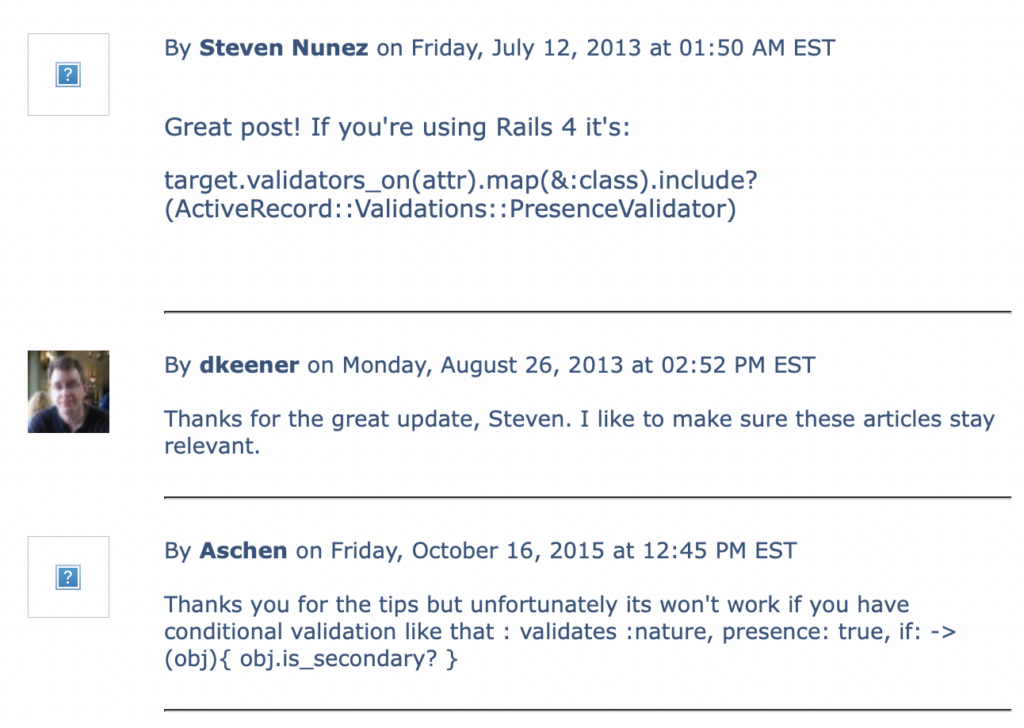
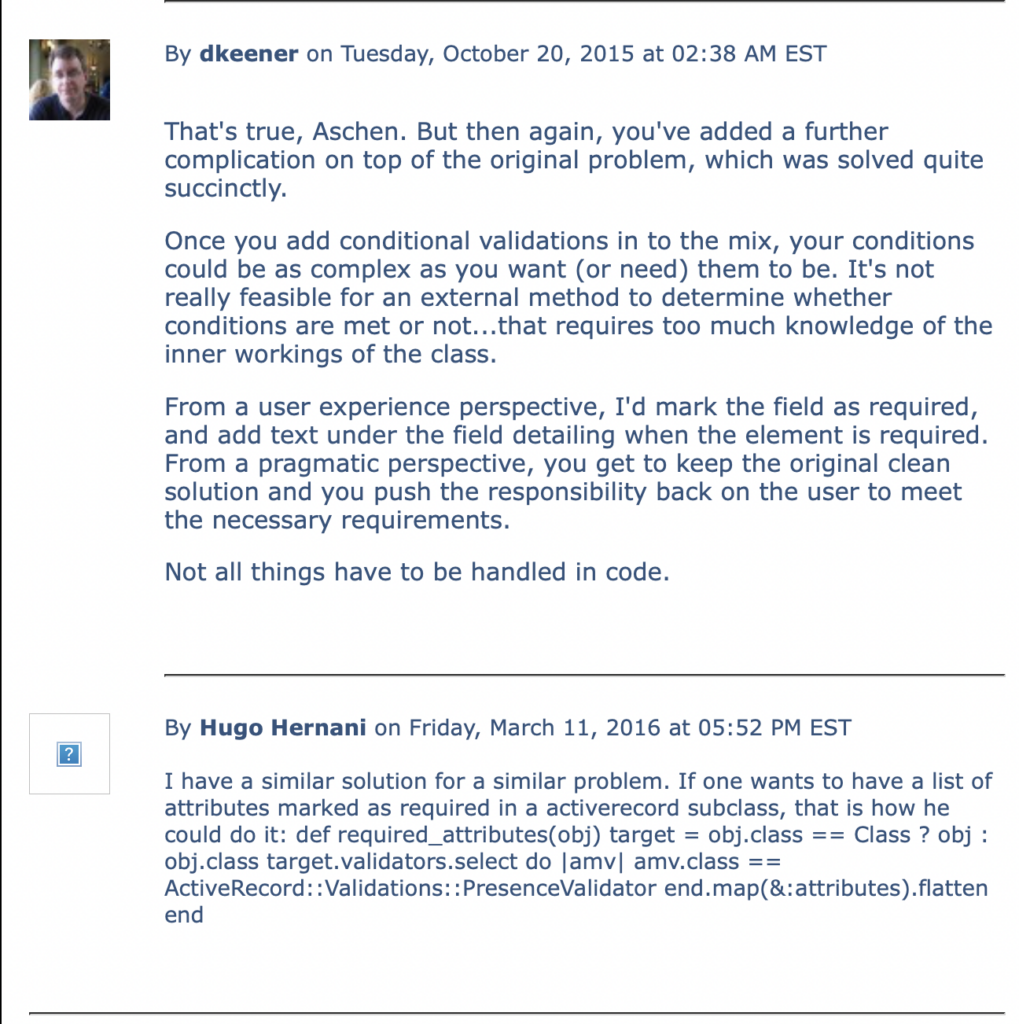
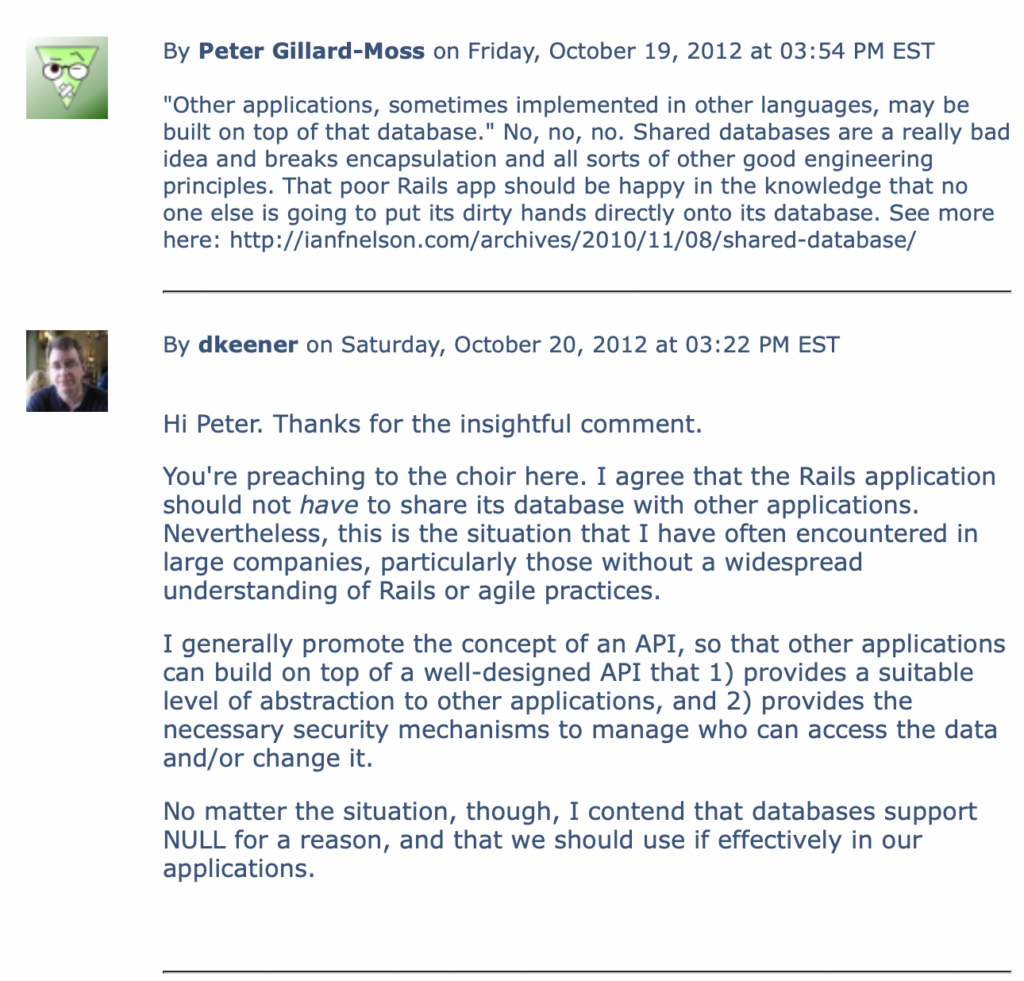
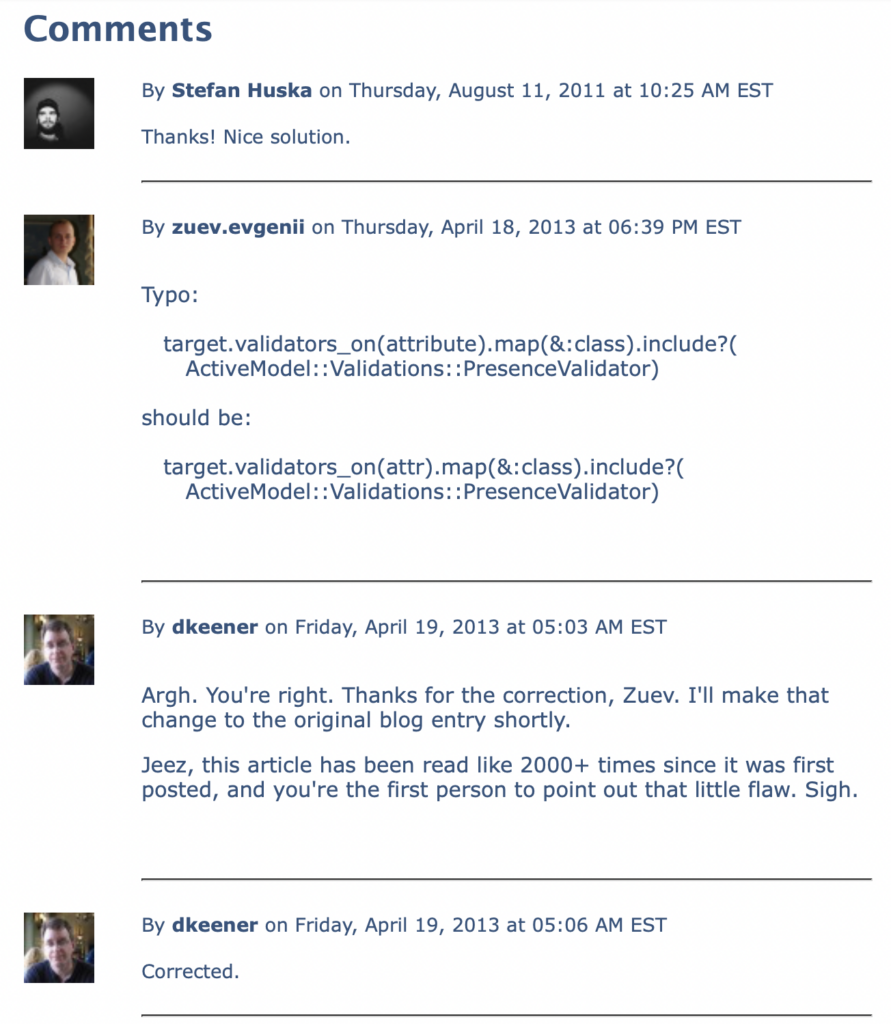
[May 5, 2026] This article was quite well received back in the day. Since I can’t easily port the comments from the old version of the KeenerTech.com website, I pulled some screenshots instead:

First Batch of comments...
Second Batch of comments...
Third Batch of comments...

The Empty String Code Smell in Rails

Sometimes you look at some source code and it just doesn’t look right. The code might seem inordinately complex for the simple task being accomplished. Or the developer might be performing certain actions repeatedly, such as checking variables for nil values. This is what is known as a code smell..

Code smells should be corrected at the earliest possible opportunity. In this article, I’ll talk about some real-world coding issues that my friend, Robb Kidd, and I recently encountered.

The Repetitive Value-Checking Code Smell

Here’s a code smell that I found in a Rails view:

   <% if @item.summary.nil? || @item.summary == ” %>
      <p>Not Defined</p>
   <% else %>
      <p><%= @item.summary %></p>
   <% end %>

This type of code was provided for every field associated with an “item.” Not good. Not surprising, though. This is a pretty common code smell from Ruby newbies.

Here’s a slightly better modification:

   <% if @item.summary.blank? %>
      <p>Not Defined</p>
   <% else %>
      <p><%= @item.summary %></p>
   <% end %>

The blank? method checks for both nil and empty strings in one method. It even works on arrays:

   arr = []
   arr.blank?

If the array is empty, as it is in the code above, then blank? returns true.

The blank? method is awfully convenient for these types of checks. It also has a companion method, present?, that does the inverse check, i.e. — it checks if a value is present (ensuring that the value is not blank).

We can shorten the original code even further:

   <p><%= @item.summary.blank? ? ‘Not Defined’ : @item.summary %></p>

Now we’ve got the original code sample down to one line using what amounts to an inline if-statement. That’s pretty good.

But we’re still repeating that if-statement for every field displayed. To DRY the code up even further, we could extract that statement into a helper method:

   def format_text(txt)
      txt.blank? ? ‘Not Defined’ : txt
   end

In the view, the code then becomes:

   <%= format_text(@item.summary) %>

Now the view is simple. Just the way I like it.

The Empty String Code Smell

I still wasn’t happy though. You see, the developer had told me that the reason he needed to check for empty strings everywhere was because empty strings were being physically stored in the database.

This was something that Robb Kidd and I began investigating immediately.

To me, this code smell was far worse than the original view-related one that had triggered this deep dive into the codebase. I was appalled that empty strings were being stored in the database.

This might not seem like a big deal to many Rails developers. But with the types of high-end enterprise systems that I typically build, high-quality data is vital. Relational databases represent empty fields as NULL. Once you start putting empty strings into database fields, you have compromised the usefulness of NULL to represent the absence of information. You’ve also doomed everybody who ever works with that database to check for both NULL’s and empty strings if they want to determine whether a valid value is present.

You’ve stored a code smell in the database for all eternity. Not good.

Even worse, the database may be an underlying component of a Rails application, but there’s nothing in an enterprise setting that ties it exclusively to the Rails application. If the Rails application is successful, then much of the application’s value derives from the integrity of the data that has been stored. Other applications, sometimes implemented in other languages, may be built on top of that database.

By pushing a code smell into the database, we’re forcing all future developers, not just Rails developers, to deal with the compromised usefulness of NULL. We may very well hear this from some future Python developer, “Jeez. Those Rails dweebs were amateurs. This wouldn’t have happened if they’d used Django.”

We should definitely deal with this problem. But first, how does it happen?

The application allows users to enter data via forms. Upon submission, Rails collects all submitted values into the standard params hash that is made available to controllers. Any form field that is a text field or text area will be assigned the empty string as a value. the following controller code perpetuates the empty string into the database:

   Item.create!(params[‘item’])

Whoa. So I can hear you asking: “So this is a Rails problem?”

Yes. It is a Rails problem, and one that in my humble opinion should never have slipped through the cracks.

But we still need to correct it in our application. So, Robb and I started researching possible solutions.

The best solution we came across was from Henrik Nyh, a Ruby developer in Stockholm, Sweden. He published an excellent code snippet on GitHub’s gist sub-site. This is a site at gist.github.com that allows developers to publish short snippets of code that solve problems.

His code is a mix-in module that updates ActiveRecord’s write_attribute method to properly handle empty strings.

   module NullifyBlankAttributes

      def write_attribute(attr_name, value)
         new_value = value.presence
         super(attr_name, new_value)
      end

   end

Note the use of the presence method, which takes an argument and returns either the argument itself or nil if the argument was blank.

Now what? What do we do with the module?

First, drop the module in the lib directory of the Rails application. Second, create an initialization file in the config/initializers directory of the Rails application. Let’s call it active_record_fixes.rb. The contents of the file will be:

   class ActiveRecord::Base
      include NullifyBlankAttributes
   end

We have just monkey-patched Rails to correct our empty string code smell.

Conclusions

We discovered a code smell in our view code that masked a more pernicous underlying code smell. We got rid of both code smells with the help of a developer from Sweden that we’ve never met.

There are a few lessons to be learned from all this. First, code smells increase the maintenance profile of your application over time, making it more difficult to add new features and maintain existing ones. Code smells are an indication of a coding problem, and should be fixed as soon as feasible, even if the code is functionally working just fine.

Second, when you have a problem, don’t re-invent the wheel. We’re an international coding community. Somebody may very well have solved the problem already. Spend some time researching using Google in case somebody’s already developed a solution. In this case, Henrik solved the problem nicely a few years ago.

Finally, give back to the community. If you solve a problem that might reasonably impact others in the community, post a solution. Write a blog entry (as I have done). Or post a code snippet on gist.github.com, or answer a question posed on sites like Stack Overflow. Coding is hard enough as it is. Let’s share some solutions to make it easier on all of us.

Reception

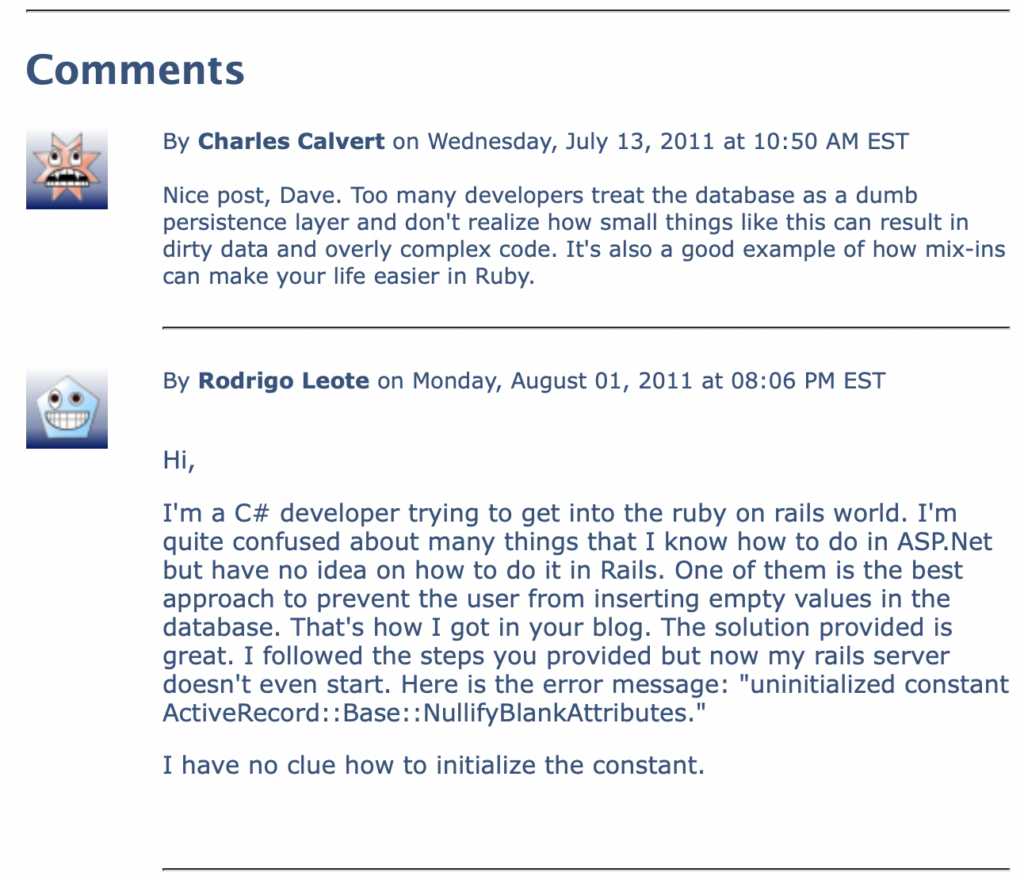
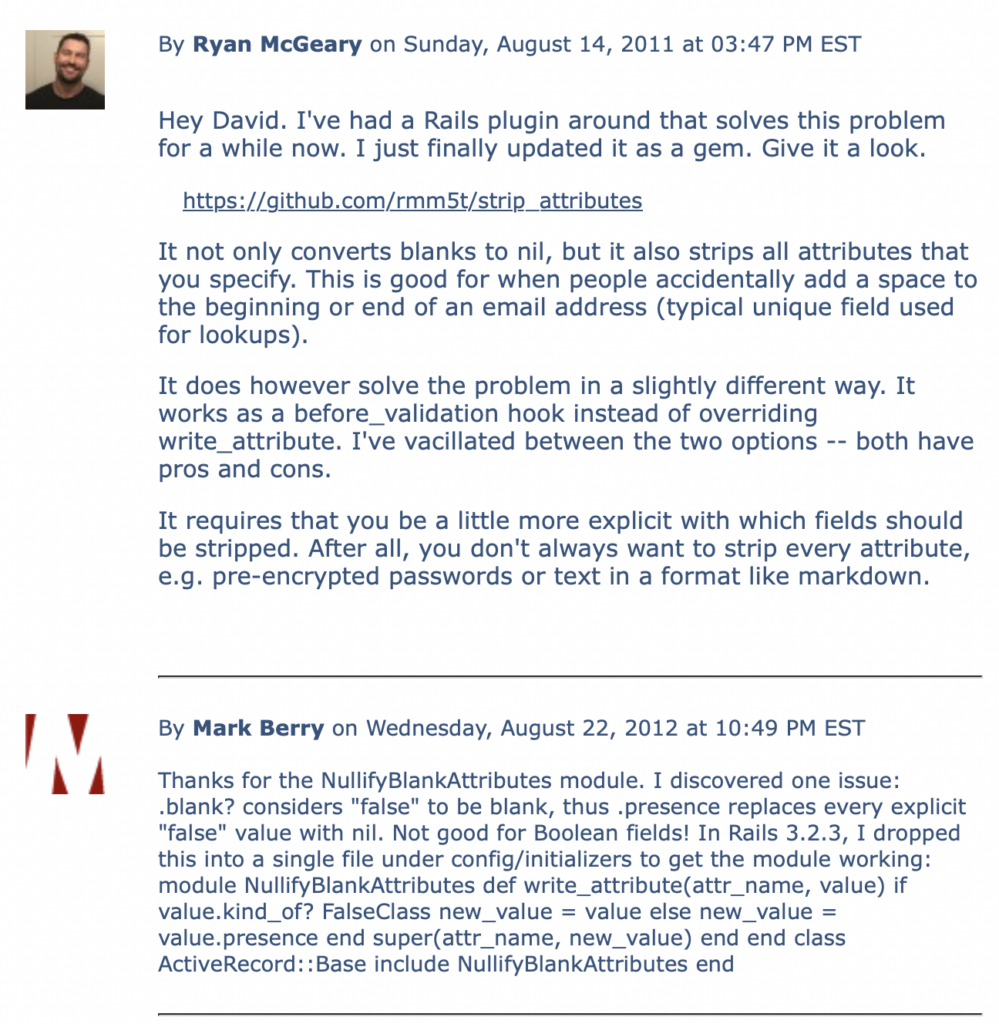
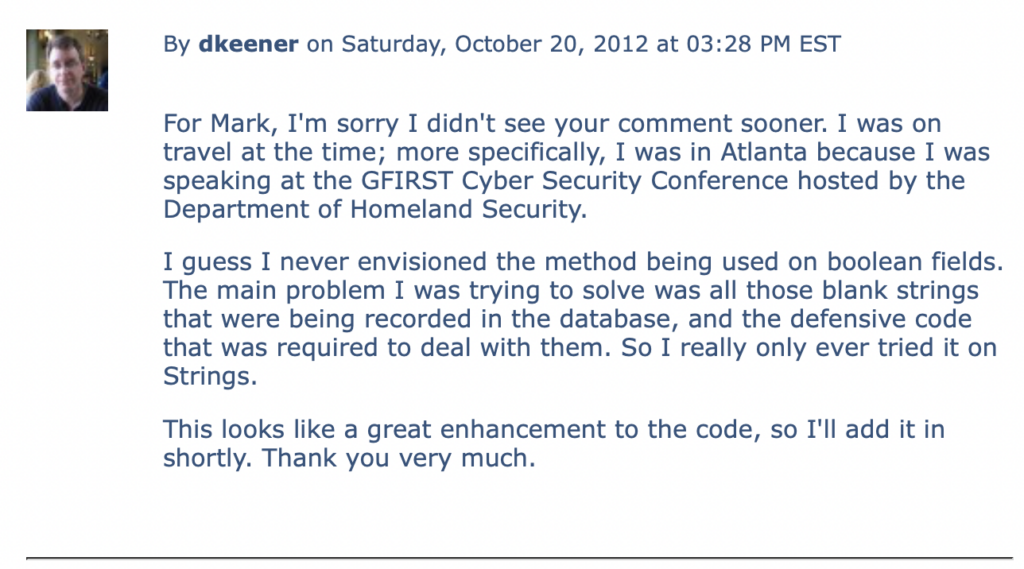
This article was well received and generated a number of excellent comments. Since I don’t have a way of porting them in smoothly from the old website, I’ve included snapshots of the comments…

First Batch of comments...
Second Batch of comments...
Third Batch of comments...
Fourth Batch of comments...

The Ruby Insurgency

The Joe O’Brien and Jim Weirich talk, “The Ruby Insurgency,” is now available on Blip.tv, featuring imaginative skits to show Rubyists the mindset of customers. And, of course, our own Dave Bock makes a special guest appearance in the video. Check it out!

Recipe: Parsing RSS and Atom Feeds

Sometimes it’s desirable to be able to ingest a remote RSS or Atom feed in order to make content available within a web application. Clearly, the easiest way to expand the content offerings of a web site is to incorporate content from other sources. Standards like RSS and Atom were designed precisely to support the syndication of content in this fashion.

The first thing that pops into the heads of developers when this kind of requirement comes up is the dawning realization that they may have to create some really ugly XML-parsing code. It just sounds like one of hose dreary, painful programming tasks that occasionally come down the pike.

The Problem

Ingest RSS or Atom feeds and parse the content so that it can be repurposed for the needs of a Rails web application.

The Solution

The HTTParty gem makes it almost trivial to parse both RSS and Atom feeds. Listing 1 shows the Ruby code for the Feed class.

Listing 1: The Feed Class

  class Feed
    include HTTParty
    format :xml

    def initialize(feed_url)
      @feed_url = feed_url
    end
  
    def feed_url
      @feed_url
    end
  
    def url
      uri = URI.parse(@feed_url)
      strip_feed_extension(uri.scheme + '://' + uri.host + uri.path)
    end

    def latest(params={})
      response = {}
      begin
        response = Feed.get(@feed_url)
      rescue REXML::ParseException => e
        RAILS_DEFAULT_LOGGER.warn("forum feed parse error: " + e.message)
        response["feed"] = ""
      end
    
      response["feed"]
    end
  
    private
  
      def strip_feed_extension(uri)
        str = uri.sub(/.atom/, '')
        str.sub(/.rss/, '')
      end
  end

Place the feed.rb class in the lib directory of your Rails application. Then run script/console to bring up a console.

> f = Feed.new('https://www.keenertech.com/articles.atom')
> feed = f.latest

That’s all there is to it. The feed has been parsed already. So, let’s view some summary information about the feed.

> feed['title']
KeenerTech.com
> feed['link']['href']
https://www.keenertech.com/articles.atom

Well, that’s great, but what about the entries?

> entries = feed['entry']
[ {}, {}, …]
> e = entries[0]
> e['title']
Leveraging Rails to Build Facebook Apps
> e['author']['name']
David Keener
> e['link']['href']
https://www.keenertech.com/articles/2010/09/29/leveraging-rails-to-build-facebook-apps
> e['summary']
My presentation on "Leveraging Rails to Build Facebook Apps," which I just gave at SunnyConf, is now available online. This presentation is a distillation of some of the practical tactics that my development team at MetroStar Systems has used to create highly successful…

Now, to quote SpiderMan, “with great power comes great responsibility.” HTTParty is just using REXML to do the parsing, which isn’t the speediest parser around but it’s more than good enough for most processing tasks.

Still, for performance reasons, you wouldn’t want to parse a remote XML feed every time a particular web page was requested. So, this is the type of task that demands some form of data caching, whether memcache or simply storing feed data in the database for later use.

Creating a Breadcrumb Trail in Rails, Part 2

A breadcrumbs trail is a navigational aid that shows users a hierarchical view of the web pages they’ve traversed. It’s a simple and useful way to orient users within a web site, especially as web sites get deeper and more complex.

This is Part 2 of a series of articles on creating a breadcrumb trail. Part 1 focused on creating the basic code for generating a breadcrumb trail, albeit with a few minor limitations. This article focuses on streamlining the code a little, while packaging it up to be more reusable.

Streamlining the Code

Using the original code from Part 1, the show_breadcrumbs method could be called in a view to generate the HTML for the breadcrumb trail, as shown below:

       <%= show_breadcrumbs(
          ['Home', ['main'], 
           'Tools', ['tools'],
           'Antimatter', ['tools', 'antimatter']],
          :direction => 'left') %>

In the code above, the first argument is an array, where each breadcrumb element is represented by a pair of array entries. The first value is the name of the breadcrumb, e.g. – the name of the link. The second is an array containing the data necessary to construct the link, such as [controller, action] or [url]. In practice, this all turned out be overkill.

As much as possible, most developers nowadays are using a RESTful approach when building Rails web sites. With a RESTful approach, you use map.resourcesin your routes.rb file to define resources, which have well-defined behaviors, e.g. – List, Show, Create, Edit, etc. As a by-product, Rails defines helper methods that can be called in views and controllers to provide the URL for a route. For example, an “articles” resource will possess an articles_url method that represents the List action for instances of that type of resource.

Bottom Line: Most developers are tossing around URLs, rather than controller/action pairs. So, we can simplify the structure that we’ve been using to represent a breadcrumb trail:

       <%= breadcrumbs(
          ['Home', root_url, 
           'Tools', tools_url,
           'Antimatter', antimatter_url],
          :direction => 'left') %>

So, now a breadcrumb trail is represented as an array, with each consecutive pair of elements defining the label and URL, respectively. The caller is responsible for providing the URL, which can be either a relative (“/home/tools/antimatter”) URL or an absolute URL. It can even be an external URL or a URL with parameters.

Furthermore, we’ll rename the show_breadcrumbs method to simply breadcrumbs. This isn’t just a syntax change; the method generates the HTML for a breadcrumbs trail. It doesn’t actually show the breadcrumb trail.

This also facilitates the use of the method in both views and controllers, rather than just views. Within a view, the generated HTML can be displayed, as show in the code above. If used in a controller, the generated HTML can be placed in a variable that will be accessible to the view.

       @trail = breadcrumbs(
          ['Home', root_url, 
           'Tools', tools_url,
           'Antimatter', antimatter_url],
          :direction => 'left')

This approach seems reasonable to me. It provides developers with reusable code for generating the HTML for a breadcrumb trail, but lets the developer determine where the responsibility for generating a breadcrumb trail belongs.

The modified code is shown in Figure 1.

Listing 1 – Modified Breadcrumbs Code

module Breadcrumbs

  def self.included(klass)
    klass.send(:extend, ClassMethods)
    klass.send(:include, InstanceMethods)
  end

  module ClassMethods

  end # ClassMethods

  module InstanceMethods

    # Returns a string containing the HTML necessary to display a 
    # breadcrumb trail. The first arg contains an array of elements,
    # where the first element is the name of a breadcrumb, the 
    # second is an array containing values for assembling a URL
    # (controller, controller & action, or external URL), and so on in
    # alternating fashion. The final arg is a hash containing options,
    # where the only option currently defined is ":direction". This
    # can have values of either "left" or "right", and governs which
    # way the breadcrumbs will be oriented. The default is "right".
    #
    # An example of the method's usage in a view is:
    #
    # <%= breadcrumbs(
    #        ['Home', 'home_url', 
    #         'Tools', 'tools_url',
    #         'Antimatter', 'antimatter_url'], :direction => 'left') %>
  
    def breadcrumbs(crumbs, opts = nil)
      direction = 'right'                        # Default direction
      separator = breadcrumb_separator_right     # Default separator
      if opts != nil
        dir = opts[:direction]
        if dir == 'left'
          direction = dir
          separator = breadcrumb_separator_left
        end
      end
    
      str = ""
      if crumbs.size > 0
        str += '<div id="breadcrumbs">'
        if direction == 'right'
          i = 0
          while i < crumbs.size
            url = crumbs[i + 1]
            str += " #{separator} " if i > 0
            str += build_crumb(crumbs[i], url)
            i += 2
          end
        else # Direction equals left
          i = crumbs.size - 2
          while i >= 0
            url = crumbs[i + 1]
            str += " #{separator} " if i < (crumbs.size - 2)
            str += build_crumb(crumbs[i], url)
            i -= 2
          end
        end

        str += '</div>'
      end
    
      str
    end
    
    # Returns TRUE if the provided value is an external URL and
    # FALSE if it represents the name of a controller. External
    # URL's can be easily distinguished because they 
    # begin with "http://".
  
    def is_external_breadcrumb?(val)
      val.to_s.start_with?('http')
    end
  
    # Returns a string containing the HTML for one breadcrumb 
    # link within a breadcrumb trail. The first argument is the title
    # of the link, while the second is the destination URL for the
    # link.
  
    def build_crumb(title, url)
      str = ""
      if is_external_breadcrumb?(url)
        str += "<a href=\"#{url}\" class=\"bt_external\">#{title}</a>"
      else
        str += "<a href='#{url}'>#{title}</a>"
      end
      str
    end

    # Defines the separator used between breadcrumb elements
    # when the breadcrumbs are traversed from right to left, i.e. - the
    # separator points to the left.
  
    def breadcrumb_separator_left
      "&lt;"
    end
  
    # Defines the separator used between breadcrumb elements
    # when the breadcrumbs are traversed from left to right, i.e. - the
    # separator points to the right. This is the direction in which most
    # breadcrumb trails are oriented.
  
    def breadcrumb_separator_right
      "&gt;"
    end
  
  end # InstanceMethods

end  # Module

Packaging As a Plugin

We’ve made some changes to the breadcrumbs code, but the code is still just a single Ruby source file stored in the lib directory of a Rails application. So, let’s turn it into a plugin.

Run the following command from the command-line:

          $ script/generate plugin breadcrumbs

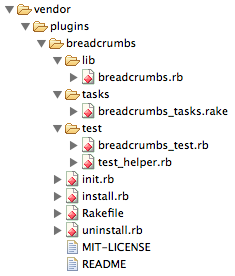
This will generate the files and directories for a plugin within the vendor/plugins/breadcrumbs directory. The files generated are shown below:

Our code from Listing 1 should be copied into the breadcrumbs.rb file in the lib directory of the plugin. We also need to add some initialization code to the init.rb file:

          require 'breadcrumbs'

          ActionController::Base.send :include, Breadcrumbs
          ActionController::Base.send :helper_method, breadcrumbs

This code ensures that the methods from the plugin are included as instance methods within the ActionController::Base class, where they’ll be accessible to controllers. However, the breadcrumbs method is also registered as a helper method, which means that it will be accessible to views, too.

This is also an improvement over the breadcrumbs code in Part 1 of this article series. The user no longer has to explicitly include the breadcrumbs code. The plugin code is automatically added to the class load path and made available to both controllers and views.

Conclusion

We’ve made some improvements to the breadcrumbs code, and we’ve packaged it up in a more reusable fashion as a Rails plugin. By doing so, we’ve also made the code a little easier for developers to use because the breadcrumbs functionality is automatically accessible to controllers and views.

We’re not done with improvements, though. Plugins have been gently deprecated in the Rails community due to their limitations, of which the primary one is their lack of a versioning capability (something that is, however, provided by gems). In Part 3 of this series, we’ll further enhance the reusability of the breadcrumbs code by converting it into a gem and, later, a gem plugin.

David Keener Speaking at “Rails 101 Night”

David Keener will be speaking, along with Gray Herter and Arild Shirazi, at the Rails 101 Night being hosted by the NovaRUG (the Northern Virginia Ruby Users Group). The night is aimed at Ruby newbies, and will be focused loosely on “rails persistence,” i.e. – how data gets stored in the database. Dave’s topic will be “Rails Tips and Tricks” — basically, a compendium of tips that Dave wished he’d had in-hand when he started programming in Rails.

Recipe: Creating an Atom Feed in Rails

Your website is now functionally complete, and it’s got a good selection of quality content to interest potential viewers. You’d like to make it easy for those potential viewers to discover your content. One of the best ways to do this is to add a feed to your site.

Feeds can be read by software referred to as a feed reader. Interested users can subscribe to your feed using their feed reader, allowing them to quickly become aware of new content when it’s added to your web site. Feed readers are widely available, so any user who’s interested in following feeds in this way should be able to find one. Even most web browsers now include a feed-reading capability.

Feeds are generally created to accomplish one of the goals below:

  • Content Distribution: A feed can contain a complete content item, such as the full text of an article or blog entry. This method allows subscribers to access the full content. Subscribers can easily extract the content and re-use it for their own purposes.
     
  • Content Notification: A feed can contain summaries of content items, such as articles, blog entries, videos, etc. Since the feed doesn’t contain the full content, it generally includes links that allow users to navigate to a URL where they can view the content. This method can be used to help drive traffic to a web site.

In this article, we’re going to create an Atom feed for the KeenerTech.com blog using Ruby on Rails, with the goal of driving traffic to the blog web site. All reasonably well-supported feed readers support both Atom and the various versions of the RSS standard. For our purposes, though, Atom is a better choice since our blog content will contain HTML tags.

The Atom Syndication Standard

The Atom Syndication Format, now at version 1.0, is a standard for syndicating content, very similar to RSS. Like RSS, information is packaged into an XML file.

Atom is, in some respects, an enhanced RSS-like standard that provides better support than RSS for diverse content types, internationalization and modularity. Many people, in fact, use RSS as an umbrella term for feed standards (e.g. — RSS 1.0, RSS 1.1, RSS 2.0, etc.) and just lump Atom in as “another” RSS standard, even though, strictly speaking, that is not correct.

What Does an Atom Feed Look Like?

An Atom feed is just an XML file that adheres to the Atom Syndication Standard. A sample Atom feed is shown in Listing 1.

Listing 1: Sample KT.com Blog Feed

<!--?xml version="1.0" encoding="utf-8"?-->
<feed xml:lang="en"
      xmlns="http://www.w3.org/2005/Atom">
   <title>KT.com Articles</title>
   <link href="http://www.kt.com/feeds"
         rel="alternate" />
   <link href="http://www.kt.com/arts.atom"
         rel="self"
         type="application/atom+xml" />
   <id>http://www.kt.com/arts.atom<id>
   <updated>2009-08-30T18:56:14Z</updated>
   <generator uri="http://www.kt.com">
      kt.com
   </generator>
   <entry>
     <title><![CDATA[Maven Introductory
         Presentation Available Online]]></title>
     <link
      href="http://www.kt.com/arts/2009/08/23/maven"
      rel="alternate">
     <id>tag:kt.com,2009-08-23:321</id>
     <author>
       <name>Steve Keener</name>
       <uri>
          http://www.kt.com/profiles/steve_keener
       </uri>
     </author>
     <updated>2009-08-24T01:26:16Z</updated>
     <published>2009-08-23T00:00:00Z</published>
     <summary type="html">My presentation,
        <a href="http://www.kt.com/docs/Maven.pdf">
        Maven: Managing Software Projects for
        Repeatable Results</&;gt;, is now available
        online. Find out how to leverage this
        sophisticated build tool to automate
        key tasks for your next Java project.
     </summary>
</entry></feed>

Feed Summary Elements

The summary section of the Atom feed consists of the elements defined in Table 1. An asterisk indicates elements that are required to be present for a valid Atom feed. Notes about how the element will be handled for the feed we are building in this article will be in italics.

Table 1: Feed Summary Elements

Element Description
author This element provides information about the author of the feed. Data about the author is contained in one or more child elements.

According to the standard, an author element must be provided within the feed, but there are two valid ways to specify this information. If it appears in the summary section, then it represents the author of the entire feed. Alternatively, each entry must have an author element, which would describe the author of each entry.

In this article, we’re building an Atom feed for a blog, so each entry will have its own author element. Accordingly, no author element will appear in the summary section of the XML output.

generator This element defines the software or web site that created the feed.

For this feed, the feed generator will be defined as “KT.com.”. The “uri” attribute of the element will provide a link to the KT.com website.

id * This element defines a unique and permanent identifier for the feed. In practice, the id is typically defined as the full URL of the feed. Note that the Atom standard considers this value to be an id; under no circumstances should it be treated as a URL. If a URL for the feed is needed, use the “link” element instead.
link The link element provides a URL for a resource related to the Atom feed, with the URL provided in the “href” attribute. The meaining of the link is defined by the “rel” attribute. A feed can include multiple link elements, but only one link for each valid “rel” value.

Our Atom feed will include two link elements in the summary section, one with the “rel” element is set to “self” — indicating that the URL is a self-referential link to the Atom feed itself. The other link element will have its “rel” element is set to “alternate,” indicating that the URL is a link to additional information about the feed.

title * The title of the feed.
updated *

The date/time that this instance of the feed was updated significantly. Date/time values are in the following format:

     2009-04-24T00:00:00Z

The values are in GMT, and show a four-digit year, a two-digit month and a two-digit day. The “T” character serves as a separator between the date/time portions of the value. The date value is terminated with the “Z” character. Note that it’s the “Z” character at the that implies GMT; otherwise a specific offset from GMT can be specified.

The simplest solution, and the one that I recommend, is to specify that dates using GMT. People who use the feed can easily translate that into an appropriate date for their timezone if they need to.

Entry Elements

The Atom feed includes one or more entries, where each entry provides information about a blog entry. The Atom Syndication Format provides a set of standard elements for describing content entries.

Table 2: Standard Atom Entry Elements

Element Description
author This element provides information about the author of the entry. If the entry has multiple authors, then the element will appear multiple times. Within the author element, information about the author is contained in one or more child elements. The “name” element is required. There are also two optional sub-elements, “email” and “uri”. The “uri” is typically either the URL of the author’s blog site or the URL of a profile page that provides more information about the author.

According to the standard, an author element must be provided within the feed, but there are two valid ways to specify this information. If it appears in the summary section, then it represents the author of the entire feed. Alternatively, each entry must have an author element, which would describe the author of each entry.

In our blog’s Atom feed, each entry will have its own author element. Additionally, since our blog entries can only have a single creator, only one author element will be provided for each entry.

content This element contains the full content of an entry.

We’re not going to provide a content element for our feed because we’re not trying to distribute the blog’s content. Instead, we’re trying to notify potential viewers of the content that we have available, and entice them to go to the web site. So, we’ll provide a summary of the content rather than the full content.

id This element contains a well-formed URI for a entry. A sample entry id is shown below:

     tag:keenertech.com,2009-08-16:322

link The “href” attribute of the link element specifies the URL for a web page that shows detailed information about the entry.
summary Provides a short abstract of the entry.
title A human-readable title describing the entry.
updated The date/time that this entry was last modified. Date/time values are shown in the same format as the “updated” element of the feed summary section.

Onwards to the Code

Implementing an Atom feed in Ruby is a straight-forward task. Ruby provides the Builder module which automates creating XML documents. The general technique shown in most technical books is to create a controller that retrieves a list of content items from the database. The controller then makes that list available to a view, which includes Builder code to generate the necessary XML.

My technique is a little different. In Listing 2, I pull the Ruby code to produce the feed into the model. By doing this, it’s easier to write unit tests for the Atom generation code. It’s also easier to share the code if you need to produce multiple Atom feeds, e.g. — a separate feed for each category.

Listing 2: The Ruby Code Behind the Atom Feed

 class Entry < ActiveRecord::Base

    def self.generate_atom_feed(title, entries, options = {})
      feed_ref_url = 'http://www.kt.com/feeds'
      feed_url = 'http://www.kt.com/arts.atom'
      base_entry_url ='http://www.kt.com/arts/'
      buffer = ''
  
      xml = options[:builder] ||= Builder::XmlMarkup.new(:indent => 
        options[:indent], :target => buffer)
      xml.instruct! :xml, :version=>'1.0', :encoding=>'utf-8'
  
      xml.feed 'xmlns' => 
          'http://www.w3.org/2005/Atom', 'xml:lang' => 'en' do
        xml.title title
        xml.link 'rel' => 'alternate', 'href' => feed_ref_url 
        xml.link 'rel' => 'self', 
                 'href' => feed_url,
                 'type' => 'application/atom+xml'
        xml.id feed_url
        xml.updated Time.now.utc.strftime("%Y-%m-%dT%H:%M:%SZ")
        xml.generator 'KT.com', 'uri' => 'http://www.kt.com'
  
        entries.each do |entry|
          if !entry.name.nil?
            xml.entry do
              # Create Atom entry elements
              xml << "    <![CDATA[" + entry.name + "]>\n"
              xml.link  "rel" => "alternate", 
                "href" => base_entry_url + 
                entry.display_date.strftime('%Y/%m/%d/') + entry.url_name
  
              xml.id "tag:kt.com,#{entry.display_date.strftime
                ('%Y-%m-%d')}:#{entry.id}"
              xml.author do
                xml.name "#{entry.user.first_name} #{entry.user.last_name}"
                xml.uri entry.user.first_name + "_" + entry.user.last_name
              end
              xml.updated entry.updated_at.strftime("%Y-%m-%dT%H:%M:%SZ")
              xml.published entry.display_date.strftime
                ("%Y-%m-%dT%H:%M:%SZ")
              xml << "    " + 
                 Entry.escape_html(entry.summary) + "\n"
            end
          end
        end
  
      end
      
      buffer
    end
  
  protected

    def self.escape_html(str)
      return str.to_s.gsub('&', '&').gsub('<', '<').gsub('>', '>') if str
    end

 end

In the code above, I’ve hard-coded the feed paths. If I were to generalize this code to produce multiple Atom feeds, such as for different categories, I’d need to re-factor this code slightly since each feed should have its own distinct URL.

To produce the XML, the caller must pass in the title of the feed, the list of entries to be included in the feed and any options. The options are passed directly to Builder::XmlMarkup; the only option that is really supported is the “:indent” option, which specifies how many spaces each level of XML should be indented. The Builder::XmlMarkup object will direct its output into the “buffer” string.

The Builder::XmlMarkup object makes it easy to produce XML. A statement like:

xml.title title

will produce the XML below:

<title>KT.com Articles</title>

Likewise, a statement like this:

xml.generator ‘KT.com’, ‘uri’ => ‘http://www.kt.com’

will produce an XML element that includes both content and an attribute:

<generator uri=”https://www.keenertech.com”>KeenerTech.com</generator>

Since I’ve pulled the Atom generation code into the model, the controller will need to call the Entry.generate_atom_feed method in order to produce the output. The controller will then receive the XML as a string, which it will then render without benefit of a view. The controller code is shown in Listing 3.

Listing 3: Controller Code

  def index
    @articles = Entry.find(:all, 
                           :include => :user, 
                           :order => "entries.display_date desc")
                           
    respond_to do |wants|
            wants.html do               
              render :layout => 'kt' 
            end
            wants.atom do
              xml = Entry.generate_atom_feed('KT.com Articles',
                @articles, :indent => 2)
              render :text => xml, :content_type => 'application/atom+xml'
            end
          end     
  end

The controller generates the list of articles using the find method. Note that it uses the “:include” option to incorporate user information into the list. Since the user information has been pre-fetched by find, traversing from an entry to its corresponding user will not generate additional database calls (which is something that the Atom generation code will be doing).

The controller uses the respond_to statement to determine what type of content the caller wants to produce. If HTML, Rails will use a view to generate the appropriate HTML output. If the caller has specified Atom, then the code generates the Atom output by calling the model. It then renders the content directly.

Does this break the MVC paradigm? It probably bends the rules a little bit, but the advantages outweigh the disadvantages.

The primary advantage is that the code for producing the Atom output is centralized in the model, where it can easily be shared and unit-tested. Meanwhile, the model and controller still have clearly defined roles in producing the output.

The model simply produces the output; it doesn’t render it. The controller determines what data elements will appear in the feed, gets the Atom output from the model and then causes the output to be rendered. While the controller causes the content to be rendered, it doesn’t otherwise manipulate it. We could have a view that renders the Atom output string, but it seems kind of pointless to have a one-line view.

Atom Validation

After producing the feed, you should validate it using the Feed Validator. This free service will perform a detailed analysis of Atom and RSS feeds. It produces excellent diagnostic output, as well as good recommendations for items that optional. Don’t even think about considering your feed to be “finished” until you’ve successfully validated it.

References

There are a number of relevant references available that can be useful for those producing Atom feeds:

Introduction to RubyGems

RubyGems is a package manager for Ruby code. It’s used to organize reusable code into a deliverable known as a “gem.” Everyone who has programmed in Ruby or used the Rails framework has probably installed a gem at one time or another. Even the Rails framework is packaged as a set of gems.

The troubling thing is that many Ruby developers, and most Rails developers, are not taking full advantage of the power of gems. This article will explore some of the capabilities of RubyGems and illustrate how those capabilities can be used to support real-world Rails development efforts.

The Basics

RubyGems is the project which produced the well-known gem utility program. It shouldn’t surprise anyone that packages created by the utility are known as gems.

A gem has some key characteristics:

  • It contains packaged code.
  • It has a version associated with it.
  • It may have dependencies on other gems.

The gem command can be used to install a gem:

$ gem install will_paginate

The example above installs the most recent version of the “will_paginate” gem.

$ gem install will_paginate --version 2.2.2

This example installs version 2.2.2 of the gem. 

But where does RubyGems look to find the gem? The answer is that the gemcommand has a defined set of well-known locations where it will look for gems. This includes locations such as RubyForge, a free repository of open source Ruby code.

$ gem uninstall will_paginate

This command can be used to uninstall a gem. If there are multiple versions of the gem installed, then the command will prompt for the version to be removed.

$ gem update will_paginate

Update a gem to the latest version. To update all gems, just use “gem update.”

RubyGems “Admin” Features

You can do lot more with RubyGems than just install and uninstall gems. The gem command takes advantage of the information associated with each individual gem to make a variety of other features available to users.

$ gem list

This command will display a list of all the gems (including version numbers) that are installed locally. Note that you can have multiple versions of the same gem installed on a computer.

$ gem query --remote

This command will display a list of all the gems that are available remotely from the standard search locations.

$ gem spec will_paginate

Assuming the will_paginate gem is installed locally, this command will print out detailed information from the gem specification, including version, date created, summary, dependencies, the list of files included in the gem, etc.

$ gem environment

The gem command will also show you detailed information about the RubyGems environment. The above command produced the output in Listing 1.

Listing 1: RubyGems Environment

RubyGems Environment:
  - RUBYGEMS VERSION: 1.1.0 (1.1.0)
  - RUBY VERSION: 1.8.6 (2008-03-03
            patchlevel 114) [i686-darwin9.0.0]
  - INSTALLATION DIRECTORY: /usr/local/lib/ruby/gems/1.8
  - RUBY EXECUTABLE: /usr/local/bin/ruby
  - RUBYGEMS PLATFORMS:
    - ruby
    - x86-darwin-9
  - GEM PATHS:
     - /usr/local/lib/ruby/gems/1.8
  - GEM CONFIGURATION:
     - :update_sources => true
     - :verbose => true
     - :benchmark => false
     - :backtrace => false
     - :bulk_threshold => 1000
     - :sources => ["http://gems.rubyforge.org",
              "http://gems.rubyonrails.org"]
  - REMOTE SOURCES:
     - http://gems.rubyforge.org
     - http://gems.rubyonrails.org

By viewing the output, developers can discover where the Ruby gems are installed on the local computer as well as other information. For example, the output also shows that the default locations where the gem command searches for gems are RubyForge and RubyOnRails.org.

RubyGems Documentation

There is a comprehensive online User Guide available for RubyGems. It can be found at the URL below:

http://www.rubygems.org/

I’d consider the RubyGems User Guide to be excellent if it was completely current. Since it is a little out-of-date in places, I’ll downgrade it slightly to good, rather than excellent. Despite a few discrepancies between the content and the current state of RubyGems, it’s still a useful manual.

Conclusion

RubyGems has been an extremely successful package. As such, it is now required by Rails 2.0.2 as a dependency. During the boot process, Rails also loads RubyGems, so there’s no longer a need for developers to use require statements to load RubyGems. This is not reflected in the online documentation, which indicates in many places the need to load RubyGems. Additionally, be aware that RubyGems options may have also changed since the documentation was written.

If developers are working with Ruby 1.8.6 (as most of us still are, at least for production code), RubyGems will have to be installed in each environment. Beginning with Ruby 1.9, RubyGems will be automatically delivered as part of a Ruby installation.