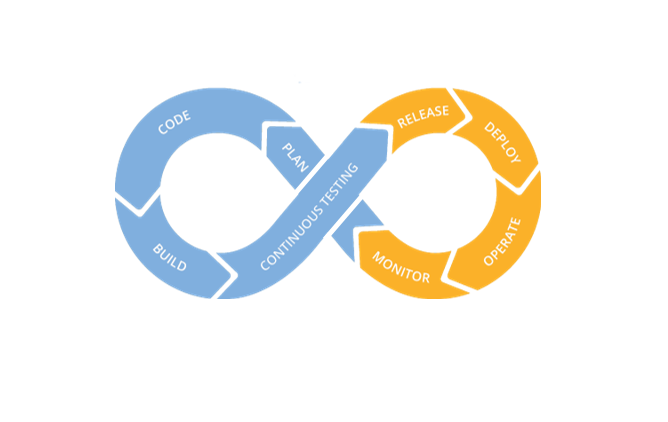
Check out this interesting article from GeekWire about the steps Microsoft has taken to end the sophisticated SolarWinds Supply Chain Hack that’s been so prominently mentioned in the news lately. It’s really interesting to see how the hack worked and how Microsoft has taken some unprecedented actions to end the threat.
A Day in the Life of An Agile Developer
This is a slightly edited version of a 2015 interview of David Keener conducted by Sharon Crowe for a technical publication.
Agile software development is nothing new … in fact, it’s been around since the mid-1980s when James Martin and James Kerr wrote about Rapid Application Development. Since customer needs and technology are evolving faster than ever, Agile provides a way to put incremental capability in front of users, so they get a better idea of what the final product needs to be.
To give some insights about the why and how of an Agile Developer, I spoke with David Keener, a Senior Software Developer based in Oakton, Virginia. Continue reading “A Day in the Life of An Agile Developer”
My Love/Hate Relationship With Static Code Analysis Tools
I have a love/hate relationship with static code analysis tools. On the one hand, they’re great at helping teams eliminate substandard code practices, especially those that may potentially result in security problems. On the other hand, they’re widely misunderstood and misused, as well, and most often often by management.
On the face of it, static code analysis tools like Fortify (a commercial tool — probably the one with the most name recognition) and Brakeman (the best tool for Ruby/Rails code) seem like an awesome idea. Rather than relying on diverse software development teams throughout the organization to properly and regularly follow best practices for coding and handling application security, let’s encode the best practices into a tool that will parse and analyze the team’s code and point out deficiencies.
Let’s parse that last sentence above a bit more closely. There are two phrases that are potentially problematic: “best practices” and “deficiencies.”
Who decides on the best practices that need to be followed? And who says that code is deficient if it doesn’t meet a best practice that the tool checks for?
The reality is that it requires judgement to assess whether a “deficiency” pointed out by a static code analysis tool is actually a problem that needs to be addressed. The only people with the technical understanding to exercise this judgement are typically the members of the development team.
It could be that the tool is overzealous in pointing out a particular type of flaw. This is true, for example, with Brakeman, which essentially attempts to stamp out any instances of metaprogramming. Brakeman flags every instance of dynamic code generation using eval( ).
Using eval( ) is not evil. It’s part of the Ruby language for a reason. It is potentially problematic if the code being executed by eval( ) is derived from user input, since a nefarious user could try to compromise the system. But determining whether the use of eval actually is a problem requires judgement, which in turn requires an understanding of the technical context of the code.
As a developer, I want to write the best code possible. I love static code analysis tools because they help me identify potential problems in my code. I’m capable of exercising the judgement to determine what does, and does not, need to be changed.
However, that determination is often not in my hands, and that’s when I start hating this type of tool. You see, management loves static code analysis tools.
Fundamentally, management doesn’t understand what software developers are doing, which is uncomfortable for management. Ultimately, management is responsible for what software development teams create, but typically doesn’t have a deep understanding of the end result.
Accordingly, management clutches on to static code analysis tools like a drowning man will latch onto a life preserver. It’s a way for them to verify that good software is being produced. It’s like the ultimate checkbox for them.
This is how using Fortify becomes an mandated best practice for government projects. Even for Ruby products, and even when the Fortify module for analyzing Ruby code is just simply awful.
Even worse, once the use of static code analysis tools become mandated, then other rules get added on. “You must submit a copy of your Fortify results with each software release.” And my favorite, “You must provide a detailed, written justification for each deficiency that is not corrected.”
This is where I start to hate static code analysis tools. Because now I have to waste valuable time to write a justification for a non-technical person who generally really doesn’t understand the issues on why I didn’t fix a “deficiency” in the code. Management often doesn’t understand that “false positives” happen or that dynamic coding (in the case of Ruby) is useful.
This is why I have a love/hate relationship with tools like Fortify and Brakeman. I love them because they help me, and my teams, to write better, more secure code. But I hate being bludgeoned by their results when the capacity to properly evaluate their output is taken away by management.
About the Target Attack
For those who might be interested in what really happened during the recent Target retail attack, where information about 40 million credit cards was stolen (including mine), here’s a really interesting article from Security Week:
http://www.securityweek.com/target-confirms-point-sale-malware-was-used-attack
In a nutshell, the attackers used a RAM scraper to pull credit card information that was stored “in the clear” within memory.
And yes, I was issued a new card because of this whole fiasco.
Domain Names for Non-Techies
One of my non-technical friends, a writer and motivational speaker, bought a new domain name recently, then asked me how to get it pointed to her soon-to-be-rebranded website. The ensuing discussion revealed that she, like most non-techies, knew next to nothing about domain names, other than that “she needed one.”
Since I suspect there are many other people around just like her, I thought it might be a good idea to demystify domain names. So, let’s go on a tour through the wild, wild badlands of the Internet.
A Registrar is a company that has been authorized to register (and accept payments for) domain names.
A Hosting Company provides computers on the Internet that can host web sites. For small sites, which pretty much defines the kinds of sites that writers and motivational speakers have, they’ll usually host multiple web sites on one computer. Sometimes Registrars also function as Hosting Companies to secure additional income, but the two roles are distinct.
Every computer on the Internet has an ugly, non-intuitive address that looks something like this: 123.10.234.56. That’s known as an IP Address. They’re not very easy for people to remember. So some bright people invented Domain Names, which are like relatively easy-to-remember names that can “point” to an IP Address.
Except that it’s not quite that simple. How do you find out what IP Address a Domain Name points to? You could query every computer on the Intenet: “Hey buddy, do you answer to keenertech.com?” But that might take a while.
So somebody really devious came up with the idea of the DNS Name Server, which is basically a computer that 1) holds information about a whole bunch of domain names and where they point to, and 2) can respond with the correct IP Address if you politely ask it about a domain name. But, sometimes computers crash, so most people who run DNS Name Servers also run a backup server just in case the first one fails.
Now we come to the fun part. Your Hosting Company has DNS Name Servers associated with your hosting account. You can usually look up what they are using some via sort of “Dashboard” or “Control Panel” that they provide to their customers. When you find their DNS Name Servers (sometimes they’ll be listed as just “name servers”), record that information.
Next, you need to login to the Registrar, who generally has their own Dashboard or Control Panel, and tell them what DNS Name Servers will be associated with your domain name. By default, they’ll list their own name servers — you want to change the name servers to the ones from your Hosting Company.
Back at your Hosting Company, you need to create a web site, generally something that can be done via their Dashboard. Next, you need to tell them, via the Dashboard, which Domain Name will point to your web site. They’ll make sure their DNS Name Server properly directs Internet users to your web site.
If your Registrar and Hosting Company are the same, then they’ll already have them handled by a DNS Name Server. All you’ll have to do is configure your web site so that the Hosting Company knows what Domain Name you’re using.
Once you set up your Domain Name to point to your web site, you may have to wait a few hours for this to propagate outward so the rest of the Internet knows where to find your web site. You should double-check to make sure that both your Domain Name and your Domain Name preceded by “www” point to your web site.
Awesome! Now you’re using a real Domain Name, and look look so much more professional than all those other folks using derivative and unprofessional addresses like great-speaker.blogspot.com. If you have any problems, check the documentation on your Hosting Company’s web site — setting up Domain Names is a common problem that they deal with all the time. If all else fails, don’t be afraid to send an email to Customer Support — they will help you out.
I hope this tour of IP Addresses, Domain Names, Hosting Companies and Registrars has been useful to some of you.
MySQL: A Grab Bag of Useful Bits
Database management tools are nice to have, but they’re not essential (I’m talking about you, MySQL Workbench). When the tools aren’t working, for whatever reason, you can always go back to basics and create the objects you need from the simple, mysql command-line utility. Here’s a grab bag of things you can do…
What User Accounts Exist?
Login to the mysql command-line utility as root. Execute the following commands:
mysql> use mysql
Database changed
mysql> desc user;
+------------------------+---------------+------+-----+---------+
| Field | Type | Null | Key | Default |
+------------------------+---------------+------+-----+---------+
| Host | char(60) | NO | PRI | |
| User | char(16) | NO | PRI | |
| Password | char(41) | NO | | |
| Select_priv | enum('N','Y') | NO | | N |
| Insert_priv | enum('N','Y') | NO | | N |
| Update_priv | enum('N','Y') | NO | | N |
| Delete_priv | enum('N','Y') | NO | | N |
| Create_priv | enum('N','Y') | NO | | N |
| Drop_priv | enum('N','Y') | NO | | N |
| Reload_priv | enum('N','Y') | NO | | N |
| Shutdown_priv | enum('N','Y') | NO | | N |
| Process_priv | enum('N','Y') | NO | | N |
| File_priv | enum('N','Y') | NO | | N |
| Grant_priv | enum('N','Y') | NO | | N |
| References_priv | enum('N','Y') | NO | | N |
| Index_priv | enum('N','Y') | NO | | N |
| Alter_priv | enum('N','Y') | NO | | N |
| Show_db_priv | enum('N','Y') | NO | | N |
| Super_priv | enum('N','Y') | NO | | N |
| Create_tmp_table_priv | enum('N','Y') | NO | | N |
| Lock_tables_priv | enum('N','Y') | NO | | N |
| Execute_priv | enum('N','Y') | NO | | N |
| Repl_slave_priv | enum('N','Y') | NO | | N |
| Repl_client_priv | enum('N','Y') | NO | | N |
| Create_view_priv | enum('N','Y') | NO | | N |
| Show_view_priv | enum('N','Y') | NO | | N |
| Create_routine_priv | enum('N','Y') | NO | | N |
| Alter_routine_priv | enum('N','Y') | NO | | N |
| Create_user_priv | enum('N','Y') | NO | | N |
| Event_priv | enum('N','Y') | NO | | N |
| Trigger_priv | enum('N','Y') | NO | | N |
| Create_tablespace_priv | enum('N','Y') | NO | | N |
| ssl_type | enum('', | NO | | NULL |
| | 'ANY', | | | |
| | 'X509', | | | |
| | 'SPECIFIED') | | | |
| ssl_cipher | blob | NO | | NULL |
| x509_issuer | blob | NO | | NULL |
| x509_subject | blob | NO | | NULL |
| max_questions | int(11) | NO | | 0 |
| | unsigned | | | |
| max_updates | int(11) | NO | | 0 |
| | unsigned | | | |
| max_connections | int(11) | NO | | 0 |
| | unsigned | | | |
| max_user_connections | int(11) | NO | | 0 |
| | unsigned | | | |
| plugin | char(64) | YES | | |
| authentication_string | text | YES | | NULL |
| password_expired | enum('N','Y') | NO | | N |
+------------------------+---------------+------+-----+---------+
43 rows in set (0.01 sec)
mysql> select host, user from user;
+--------------------------+------------+
| host | user |
+--------------------------+------------+
| % | davekeener |
| 127.0.0.1 | root |
| ::1 | root |
| Davids-MacBook-Pro.local | |
| Davids-MacBook-Pro.local | root |
| localhost | root |
+--------------------------+------------+
6 rows in set (0.00 sec)
The mysql schema contains system information, including user accounts, privileges, etc. Once you’ve switched so that it’s your active schema, you can do a “desc” on the USER table to see what columns are available.
The only columns of general interest for our purposes are HOST and USER. That’s what the final SQL statement shows for us, revealing that there are 6 user accounts defined.
What Schemas Exist?
In MySQL, a schema, or database, is a unit that can have its own privileges, and which can contain other database objects such as tables, views, etc. You typically can’t see schemas that you don’t have permissions on, for security reasons. In order to see all of the available schemas, you’ll have to login as root.
Login to the mysql command-line utility as root and run the following command:
mysql> show schemas; +--------------------+ | Database | +--------------------+ | information_schema | | ktech_dev | | mysql | | performance_schema | | test | +--------------------+ 5 rows in set (0.00 sec)
Changing a User’s Password
Login to the mysql command-line utility as root and run the following command:
mysql> SET PASSWORD FOR 'dave'@'localhost' = PASSWORD('mvemjsun');
Query OK, 0 rows affected (0.28 sec)
The change can also be done directly by updating the USER table in the mysqlschema, but…really…I don’t advise manual updates of system tables.
Agile Spaghetti
I recently had the opportunity to take the Agile Project Management class with Brian Watson from VersionOne. This was a prep class for the PMI-Agile Test.
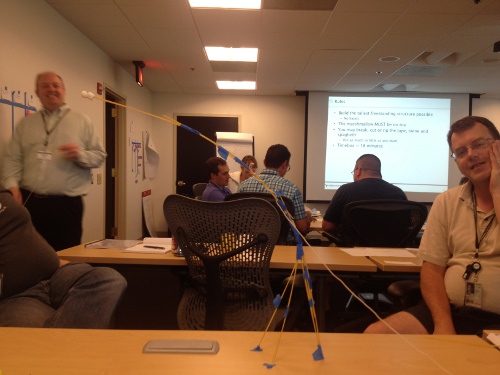
During the class, one of the exercises was to build a freestanding structure using only spaghetti, Marshmallows, string and some blue tape. My team’s end product appears below:

That’s Brian Watson, the instructor, on the left side of the picture admiring our structure, which was the first one in the class to achieve any significant height.
The rules for the exercise were:
- Build the tallest freestanding structure possible.
– No hands - The marshmallow MUST be on top.
- You may break. cut or rip the tape, twine and spaghetti.
– Use as much or as little as you want - Timebox = 18 minutes
The exercise was great fun. My team’s structure came in second place in height, due to the droopage factor. Although, if the measurement had been taken about 5 minutes earlier, we would have won.
Active Breadcrumbs Gem

Now available – the active_breadcrumbs gem. It’s a light-weight utility gem for creating breadcrumbs for Ruby/Rails websites, a standard navigational aid for websites. Now available for downloading at RubyGems.org and GitHub.
This gem makes it easy to generate breadcrumb trails in a Rails application. The emphasis is on “structural” breadcrumbs, where a breadcrumb trail reflects the logical structure of a web site (as opposed to a “dynamic” trail, which reflects where the user has been – for which I humbbly suggest the user take advantage of the browser’s Back button). For more information, see the documentation on GitHub.
Viewing Aging Git Branches
This really simple shell script from my friend, Robb Kidd, system administrator extraordinaire, shows git branches in order based on their most recent check-in date. You’d be surprised how useful this script is.
As a developer, you may be working on multiple bug fixes, plus longer-term development tasks, at the same time on a particular project. With git as your source code repository, it’s common for developers to work on each fix or task in a different branch.
But then you have to remember those branch names, and which branches you worked in most recently.
The aging script creates a simple “report” showing all branches, in order based on how recently changes have been checked in. It also shows who committed the most recent check-in.
Here’s the script:
#!/bin/bash
git branch -a | grep -v HEAD | sed s/^..// | while read branch; do
echo `git log -1
--pretty=format:"%Cgreen%ci %Creset%h %Cblue%cr%Creset (%cn)" $branch`
$branch ;
done | sort
Note that the code has been tidied up for display. The two indented lines after the “echo” line should actually be on the same line.
The output looks like this:
2012-07-10 16:37:34 -0400 0e3ac28 11 days ago (David Keener) remotes/origin/breadcrumbs_fix
2012-07-11 11:25:42 -0400 57338ee 10 days ago (Chad Fowler) remotes/origin/fix_elevated_alarm
2012-07-12 13:47:56 -0400 c3e3df0 9 days ago (Jim Wierich) remotes/origin/disableNegativity
2012-07-12 15:25:38 -0400 270537c 9 days ago (Rich Kilmer) remotes/origin/updateXMLFile
2012-07-12 16:24:39 -0400 8ce5787 9 days ago (Yehuda Katz) remotes/origin/master
2012-07-13 10:28:13 -0400 9d56685 8 days ago (Yehuda Katz) remotes/origin/dns_error
2012-07-13 10:50:02 -0400 61525d5 8 days ago (Chad Fowler) remotes/origin/XYZ_fix
2012-07-16 12:07:39 -0400 d835f8d 5 days ago (David Keener) remotes/origin/search_widget_upgrade
Mark Zuckerberg’s FaceBook IPO Letter
The open letter from Mark Zuckerberg that appears in Facebook’s IPO offering is available online. It makes for some very interesting reading. Check it out.